Charging Dock for Meta RayBan Display & Neural Band Smart Glasses | 3-in-1 Dock, One-stop Charging. Smart chip + Fast charging. Dual-Color LED Status. Contact Charging. Drop & Charge
Meta RayBan Display 및 Neural Band 스마트 안경용 충전 독 | 3-in-1 독 원스톱 충전 스마트 칩 및 고속 충전 듀얼 컬러 LED 상태 표시 접촉식 충전 드롭 앤 차지
| 상품번호 | B0GMBRNTL7 |
| 상태 | Used |
| 브랜드 | TanReginal |
| 판매자 | Amazon Resale and Fulfilled by Amazon |
| 출고국 | 미국 (US) |
아마존 판매가
$29.98
약 44,191원
구매대행 예상 비용은 로그인 후 확인하실 수 있습니다.
상품 특징
【Only Compatible with Meta Ray-Ban Display Smart Glasses & Met-A Nerve Band】: This charging dock is specifically designed for Meta Ray-Ban Display smart glasses and Met-A Nerve Band and does not support other VR headsets.When charging, turn off the smart glasses before placing them on the charging dock.
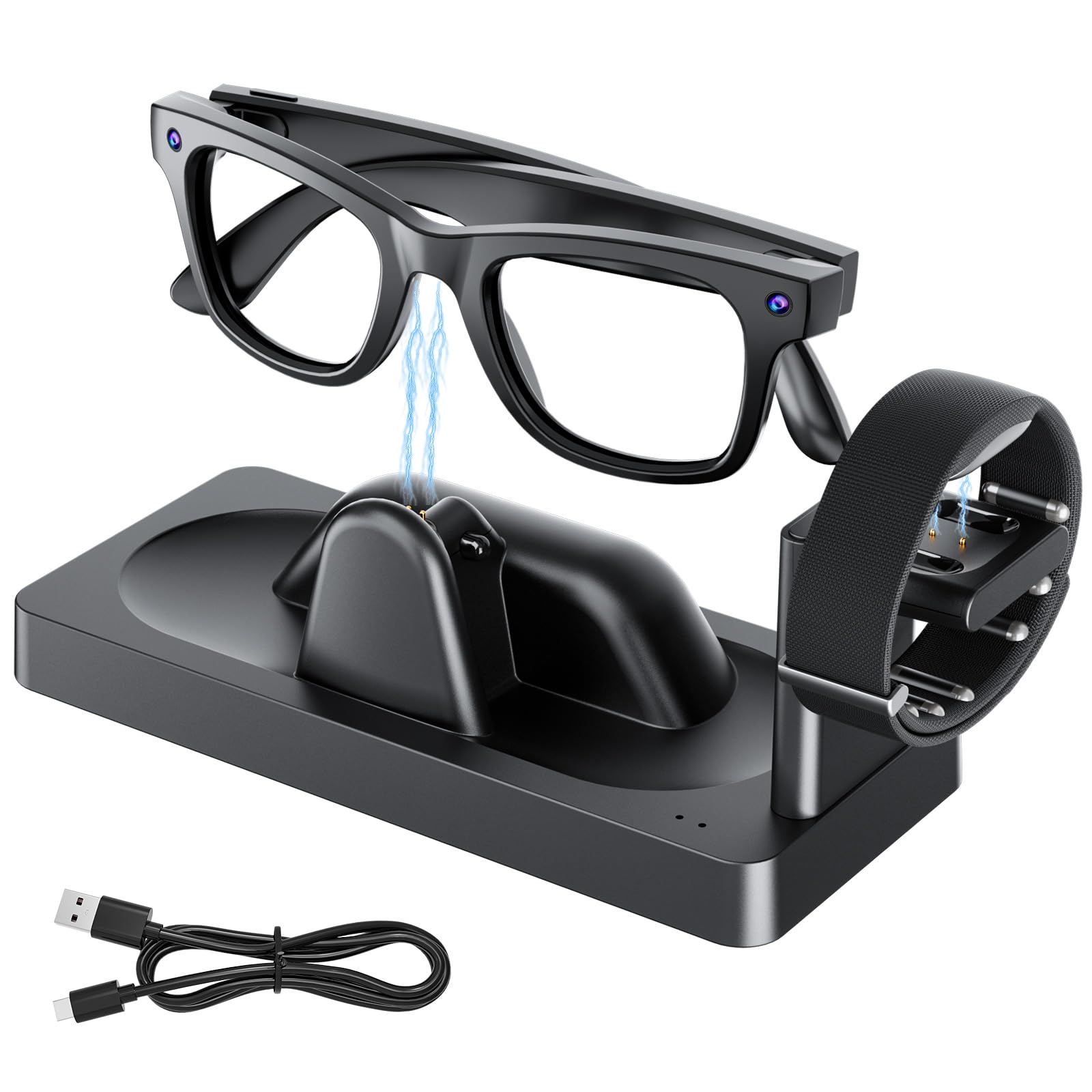
【3-In-1 Charging Dock for Meta Smart Glasses】 : This dual-charging dock is designed specifically for premium Meta glasses, simultaneously charging Meta Ray-Ban Display, Meta Neural Band, and the glasses case(Not include cables for connecting to the glasses case.). Keep your desk organized and your devices fully charged with this dedicated charging station, crafted for everyday use.
【Smart Chip & Rapid Charging】: The Smart Glasses and Nerve Band for Meta RayBan Display charging base includes a 34.3-inch/100-centimeter USB-C charging cable. It can charge both Smart Glasses and Nerve Band for Meta RayBan Display simultaneously. The built-in protection chip effectively prevents overcurrent, overvoltage, and short-circuit risks, comprehensively safeguarding the safety of your Smart Glasses and Nerve Band for Meta RayBan Display devices. You can charge them overnight with complete peace of mind.
【Charging Status Indicators】: The left indicator displays the charging status of the glasses for Meta Ray-Ban Display , while the right indicator shows the charging status of the Nerve Band for Meta . The charging status is clearly visible at a glance (red light indicates charging in progress; green light indicates trickle charging or fully charged). Note: During charging, this product transitions to trickle charging when the red light turns green. The battery will be fully charged after approximately 30 minutes of trickle charging.
【Compact & Convenient】: Smart Glasses and Nerve Band for Meta Ray-Ban Display Charging Dock Dimensions: Approx. 6.8 inches/17.5 cm × 3.2 inches/8 cm × 3.2 inches/8 cm. Weight: Approx. 0.4 lbs/200 g. Includes 39.3-inch/100 cm USB-C charging cable.
【Contact Charging】: Unlike traditional chargers, the new Smart Glasses and Nerve Band for Meta Ray-Ban Display Charging Dock requires no precise alignment with charging ports. Simply place the Smart Glasses and Nerve Band for Meta Ray-Ban Display on the dock to automatically initiate charging. Anti-slip pads on the base ensure stable placement. Copper alloy contact charging ports provide superior conductivity, effectively reducing contact resistance to minimize energy loss and heat generation.
【Charging Instructions】: When charging the smart glasses for Meta Ray-Ban Display, you must first turn off the glasses before placing them in the charging dock (slide the power switch on the left temple backward until you see a red dot), or wait 40 seconds after turning on the glasses before charging them.
Note: This product does not include Smart Glasses or the Nerve Band for Meta Ray-Ban Display. Smart Glasses and Nerve Band for Meta Ray-Ban Displayshown are for illustrative purposes only. This product is a charging dock of Smart Glasses and Nerve Band for Meta Ray-Ban Display. Usage: Connect the dock to a charger using the USB-C charging cable. Place Smart Glasses and Nerve Band for Meta Ray-Ban Display on the dock's metal contact points to charge.
【3-In-1 Charging Dock for Meta Smart Glasses】 : This dual-charging dock is designed specifically for premium Meta glasses, simultaneously charging Meta Ray-Ban Display, Meta Neural Band, and the glasses case(Not include cables for connecting to the glasses case.). Keep your desk organized and your devices fully charged with this dedicated charging station, crafted for everyday use.
【Smart Chip & Rapid Charging】: The Smart Glasses and Nerve Band for Meta RayBan Display charging base includes a 34.3-inch/100-centimeter USB-C charging cable. It can charge both Smart Glasses and Nerve Band for Meta RayBan Display simultaneously. The built-in protection chip effectively prevents overcurrent, overvoltage, and short-circuit risks, comprehensively safeguarding the safety of your Smart Glasses and Nerve Band for Meta RayBan Display devices. You can charge them overnight with complete peace of mind.
【Charging Status Indicators】: The left indicator displays the charging status of the glasses for Meta Ray-Ban Display , while the right indicator shows the charging status of the Nerve Band for Meta . The charging status is clearly visible at a glance (red light indicates charging in progress; green light indicates trickle charging or fully charged). Note: During charging, this product transitions to trickle charging when the red light turns green. The battery will be fully charged after approximately 30 minutes of trickle charging.
【Compact & Convenient】: Smart Glasses and Nerve Band for Meta Ray-Ban Display Charging Dock Dimensions: Approx. 6.8 inches/17.5 cm × 3.2 inches/8 cm × 3.2 inches/8 cm. Weight: Approx. 0.4 lbs/200 g. Includes 39.3-inch/100 cm USB-C charging cable.
【Contact Charging】: Unlike traditional chargers, the new Smart Glasses and Nerve Band for Meta Ray-Ban Display Charging Dock requires no precise alignment with charging ports. Simply place the Smart Glasses and Nerve Band for Meta Ray-Ban Display on the dock to automatically initiate charging. Anti-slip pads on the base ensure stable placement. Copper alloy contact charging ports provide superior conductivity, effectively reducing contact resistance to minimize energy loss and heat generation.
【Charging Instructions】: When charging the smart glasses for Meta Ray-Ban Display, you must first turn off the glasses before placing them in the charging dock (slide the power switch on the left temple backward until you see a red dot), or wait 40 seconds after turning on the glasses before charging them.
Note: This product does not include Smart Glasses or the Nerve Band for Meta Ray-Ban Display. Smart Glasses and Nerve Band for Meta Ray-Ban Displayshown are for illustrative purposes only. This product is a charging dock of Smart Glasses and Nerve Band for Meta Ray-Ban Display. Usage: Connect the dock to a charger using the USB-C charging cable. Place Smart Glasses and Nerve Band for Meta Ray-Ban Display on the dock's metal contact points to charge.